Published
- 5 min read
My HomeLab Project
Overview
This Home Lab is a fully virtualized enterprise-grade environment built on a Dell PowerEdge T320 server.
It serves as my personal infrastructure simulation and experimentation platform, where I combine my background in business management with IT systems, networking, and automation.
The goal is to create a controllable, scalable environment that mirrors modern enterprise IT operations—from virtualization and network security to container orchestration and local AI deployment.
⚙️ System Architecture
This Home Lab is built on a Dell PowerEdge T320 running Proxmox VE 8.4 with nested virtualization enabled.
It forms the backbone of my experimental environment, allowing me to host a variety of systems and containers across both Windows and Linux.
-
Hypervisor: Proxmox VE 8.4 (bare metal)
-
Virtualization Layer: Nested virtualization for running multi-tiered systems
-
Key Components:
-
OPNsense Firewall
-
Talos Kubernetes Cluster (Control Plane + Worker Node)
-
Windows Server Domain Controller & Exchange Server
-
Local AI Stack: Ollama, n8n, MCP, LLaMA3.1
-
SQL Server & MySQL databases
-
Cloudflare Tunnel & Tailscale VPN Access
-
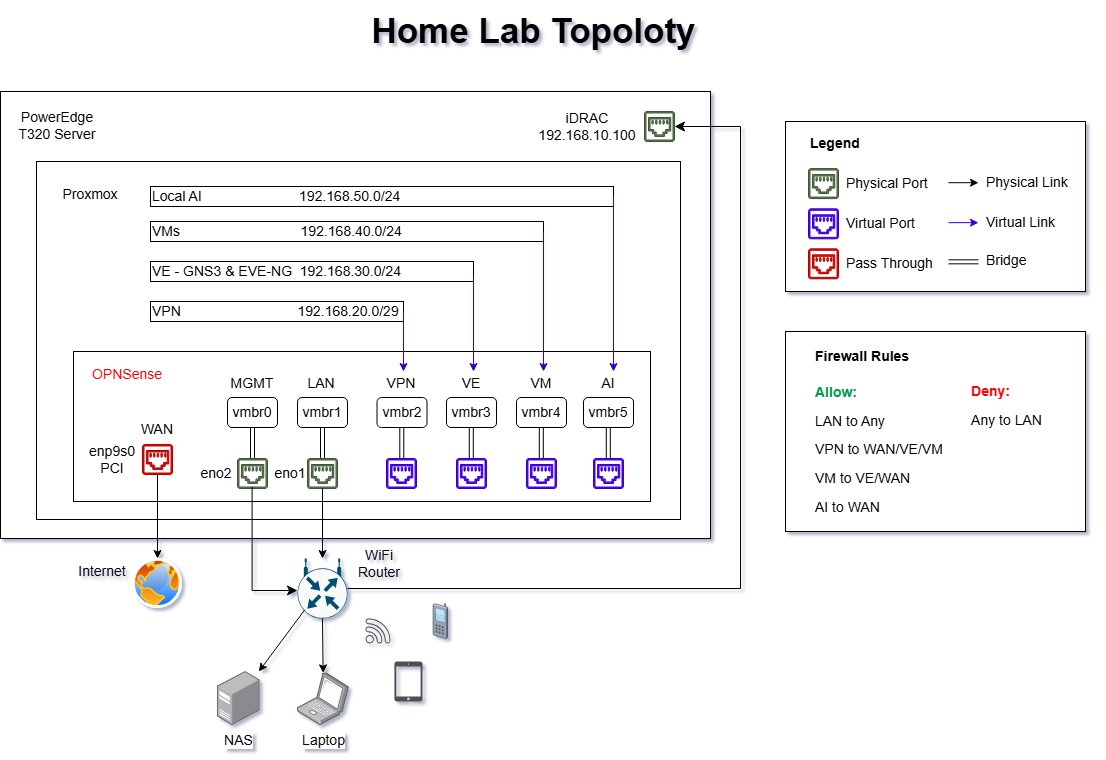
System Topology Diagram (version 2.0 - May 2025)
🌐 Network Infrastructure
Network segmentation and security are implemented using OPNsense, which manages routing, VPN, and firewall policies.
Each bridge (vmbr) represents an isolated network segment mapped to a specific function.
| Bridge | Network Range | Purpose |
|---|---|---|
| vmbr0 | 192.168.0.0/24 | Management |
| vmbr1 | 192.168.10.1/24 | LAN |
| vmbr2 | 192.168.20.0/29 | VPN |
| vmbr3 | 192.168.30.0/24 | Virtual Environments (EVE-NG / GNS3) |
| vmbr4 | 192.168.40.0/24 | Virtual Machines |
| vmbr5 | 192.168.50.0/24 | Local AI Zone |
| vmbr6 | 192.168.60.0/24 | Talos |
| vmbr7 | 192.168.70.0/30 | Synology NAS |
🔒 Firewall Policy & Security Optimization
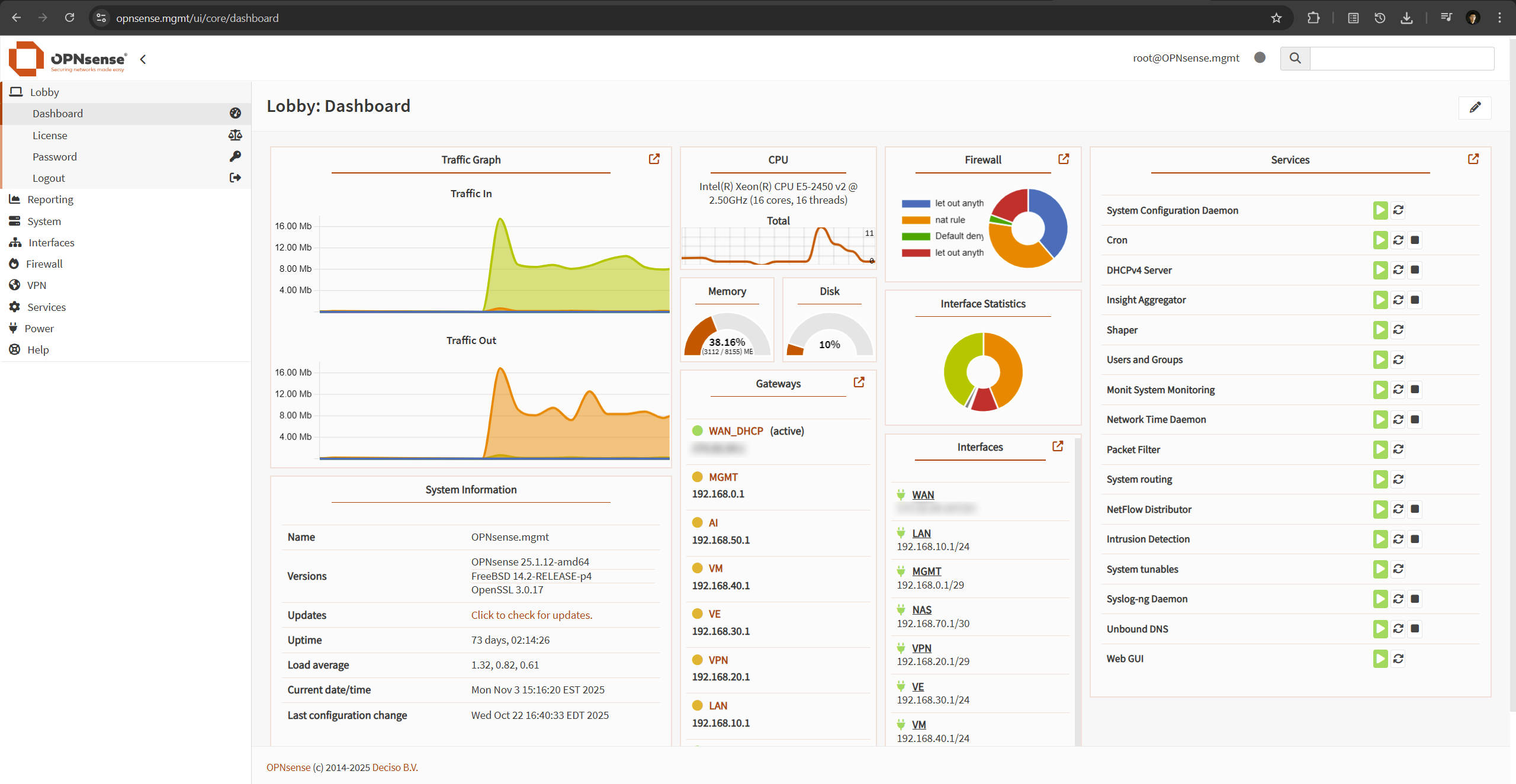
I’ve configured the OPNsense firewall with granular rules for each subnet, ensuring tight control over traffic flows and service accessibility.
-
Segment-based Access Rules – Each subnet (LAN, VPN, VE, VM, AI) has custom security rules defining permitted inbound and outbound flows.
-
Traffic Shaping and NAT for Gaming – Customized traffic queues and NAT rules were implemented to optimize latency for World of Tanks and other real-time traffic.
-
Secure DNS over TLS – Configured DNS encryption to mitigate DNS spoofing and pollution risks.
-
Unbound DNS for Internal Resolution – Set up a local DNS resolver to enable friendly names (e.g.,
proxmox.mgmt) for devices inside the LAN.
Firewall Policy Overview:
-
✅ Allow: LAN → Any, VPN → WAN/VE/VM, VM → VE/WAN, AI → WAN
-
🚫 Deny: Any → LAN
OPNsense Dashboard:
💻 Virtualization Layer: Proxmox
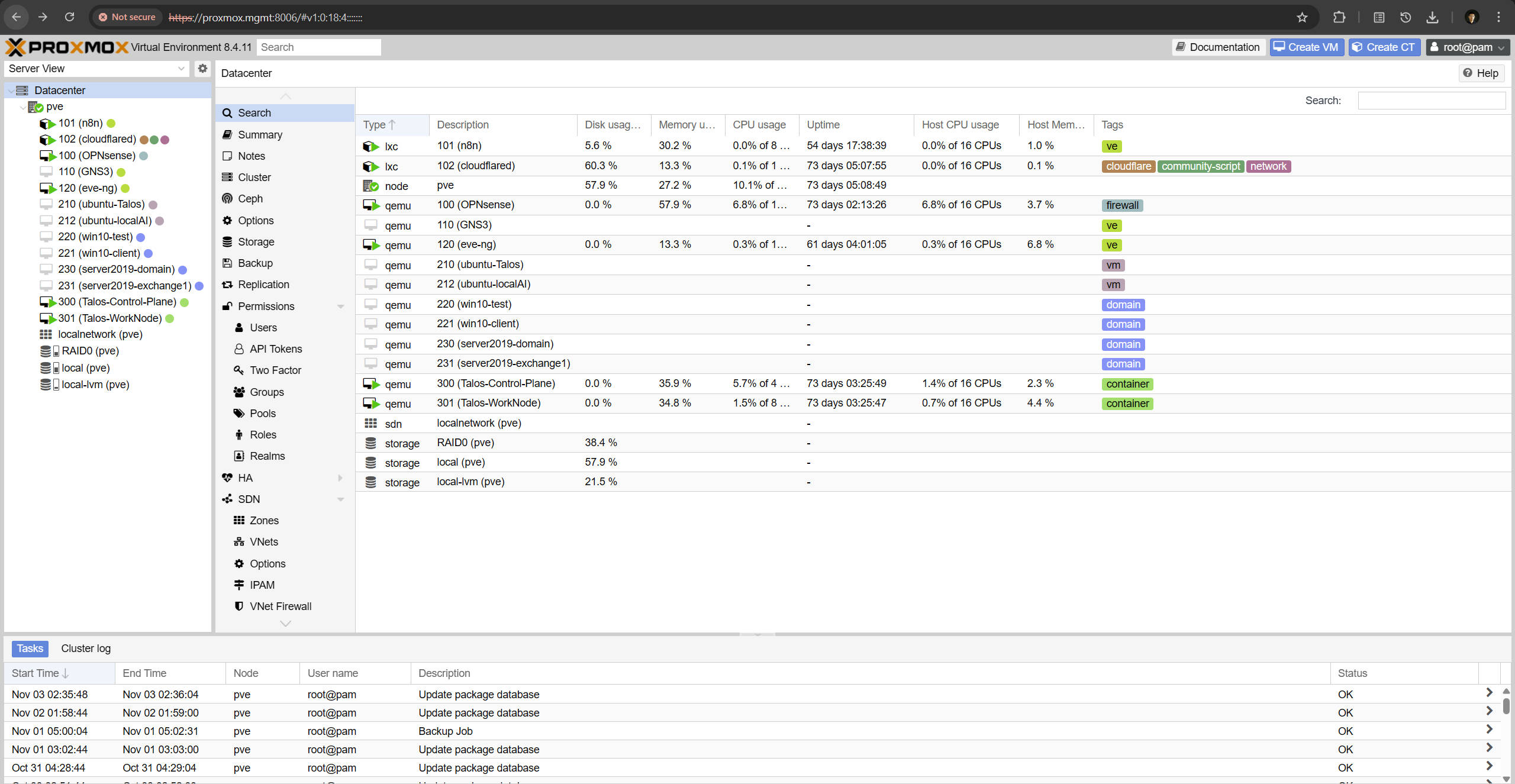
All virtual machines and containers are orchestrated under Proxmox VE, which provides flexible resource allocation and snapshot-based version control.
This architecture allows rapid deployment, rollback, and environment duplication for experimental configurations.
Proxmox Management View:
💻 Local Hosts
Local endpoints include a NAS, camera system, laptop, and multiple wireless clients connected via the LAN interface.
These devices form the physical extension of the lab environment, supporting both monitoring and hybrid operations between on-prem and virtual networks.
🧠 Practice and Independent Projects
1. Network Simulation for CCNP Preparation
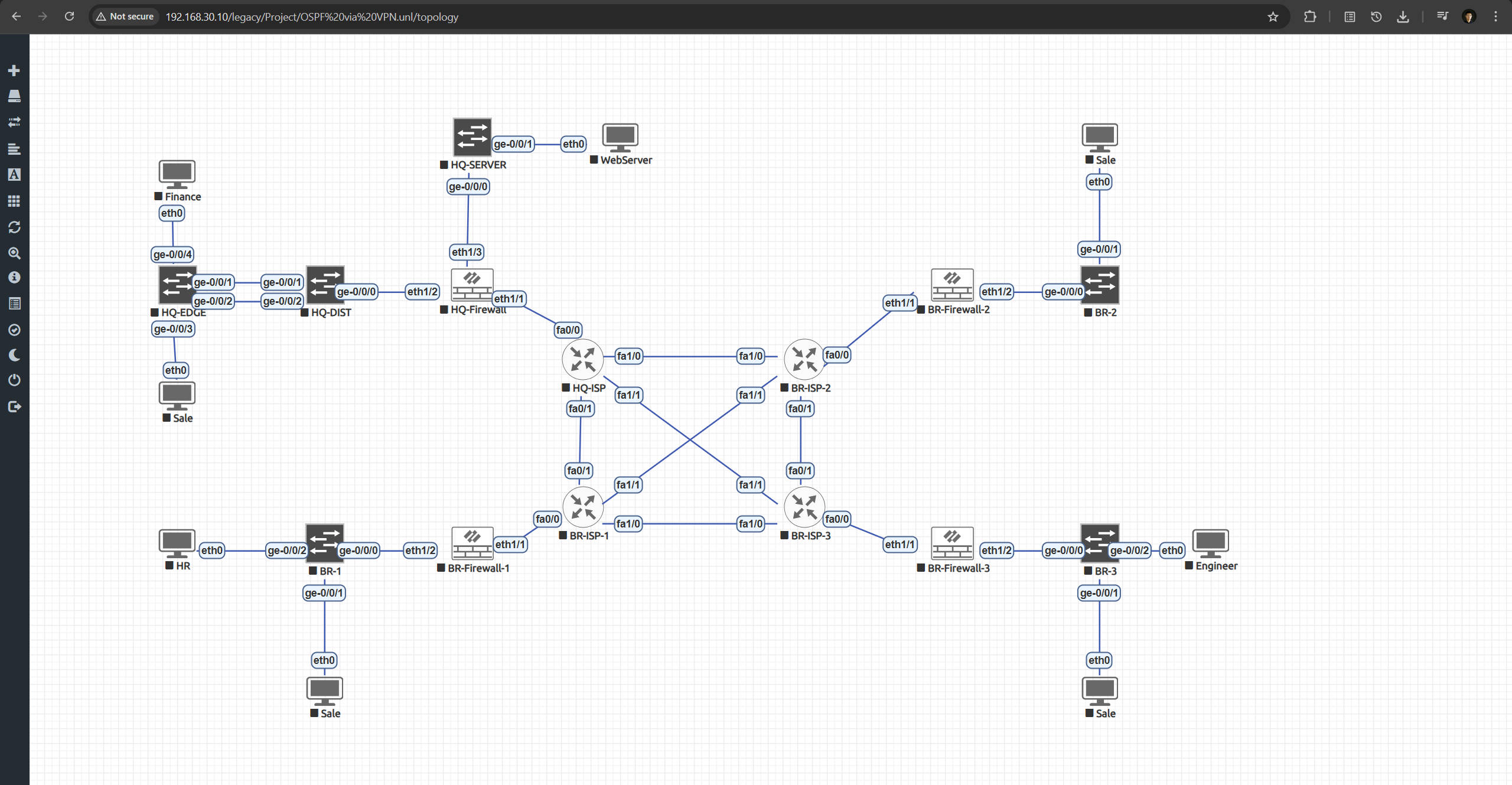
Using EVE-NG, I’ve built multi-site topologies replicating enterprise WAN structures with routing, switching, and VPN interconnects.
These simulations directly support my CCNP ENCOR studies and reinforce deep troubleshooting and protocol-level understanding.
EVE-NG Topology Example:
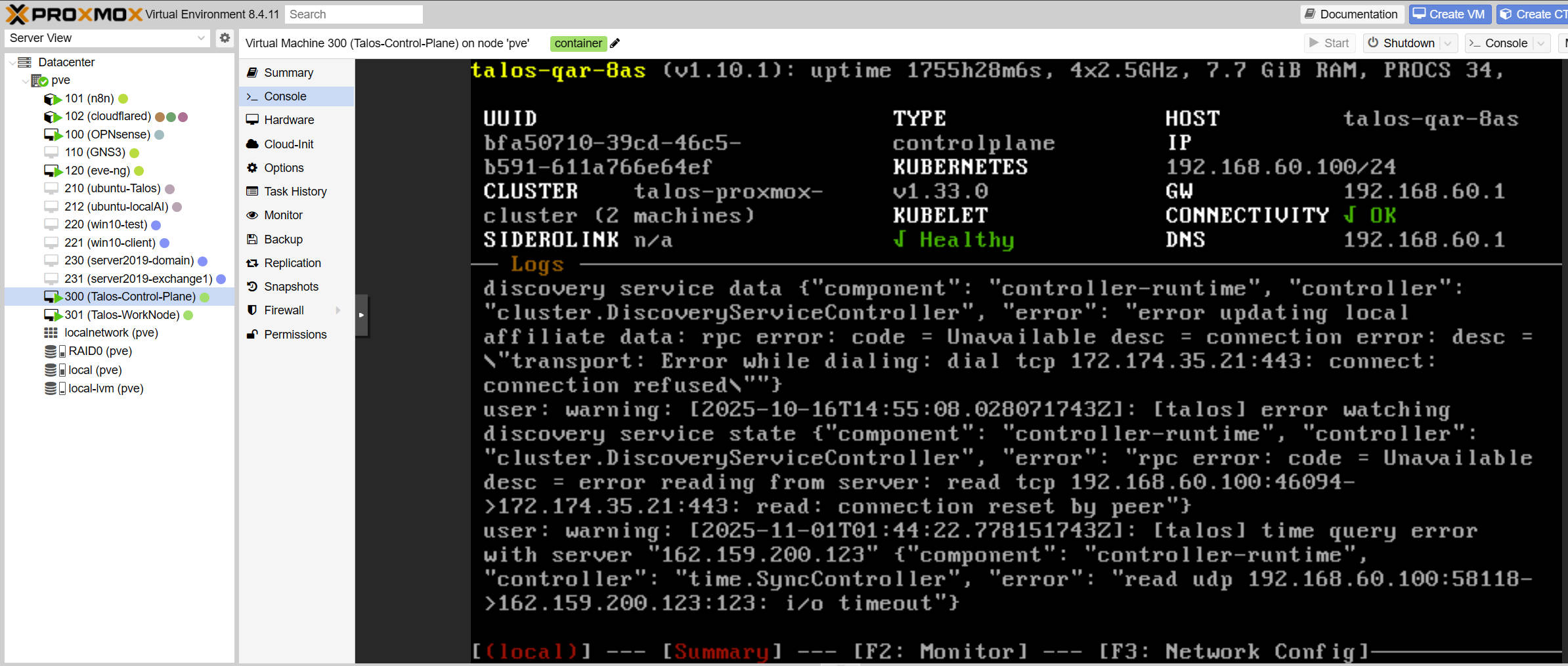
2. Kubernetes Environment with Talos
A two-node Talos Linux cluster (Control Plane + Worker) orchestrates container workloads in a declarative, immutable environment.
This provides hands-on experience with Kubernetes control, container scheduling, and service exposure via MetalLB.
Talos Cluster Console:
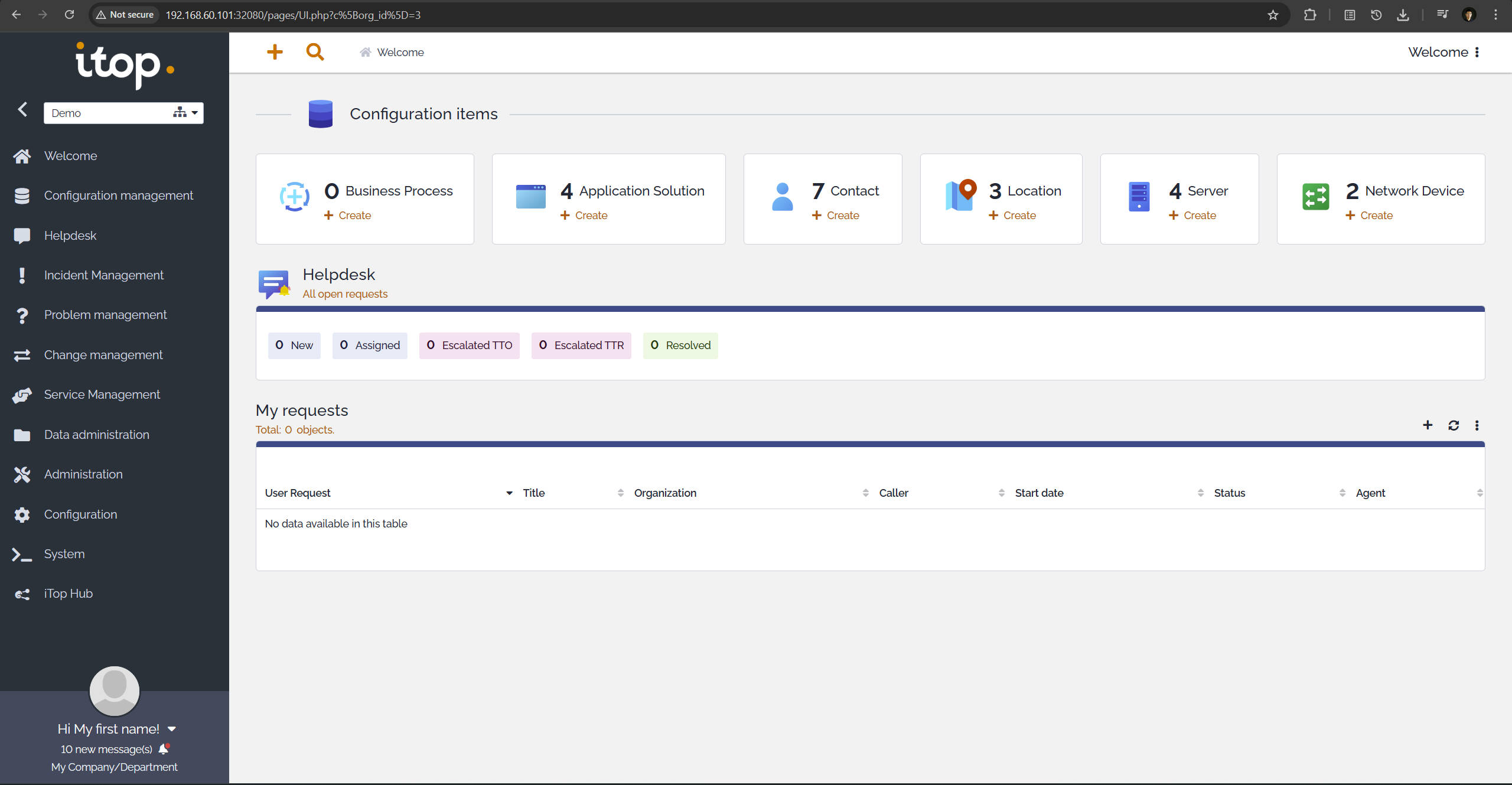
3. ITIL Practice with iTop
Deployed within Kubernetes, iTop serves as an ITSM (IT Service Management) platform that implements ITIL principles.
Through iTop, I simulate CMDB structures, incident management, and service request workflows, bridging IT operations with service management best practices.
iTop Dashboard:
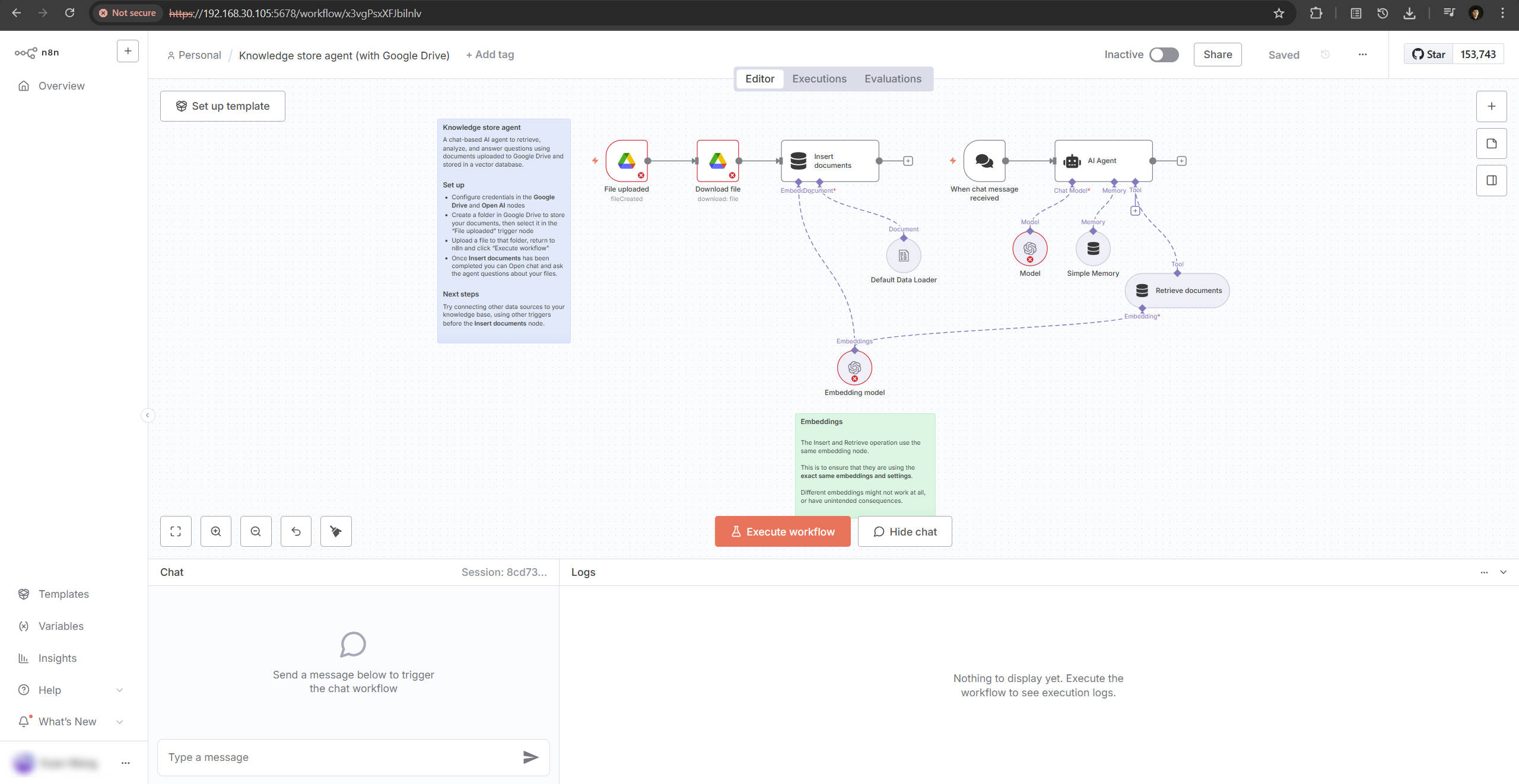
4. Automation and AI Workflow Exploration (n8n + Ollama + MCP)
To experiment with AI-driven automation, I deployed n8n for orchestrating local AI agents and workflow automation pipelines.
Although the current hardware lacks a discrete GPU, lightweight models from Ollama run efficiently on CPU, supporting prototype-level inference and knowledge retrieval.
n8n Workflow Editor:
5. Windows Server and Exchange Deployment
This segment of the lab replicates an enterprise-grade AD and mail environment.
By integrating DNS, DHCP, Group Policy, and Exchange, I can simulate authentication, user management, and communication services typical in corporate IT ecosystems.
6. Database Integration: SQL & MySQL
Both Microsoft SQL Server and MySQL databases are deployed across Windows and Linux.
They serve as back-end data stores for testing application connectivity, schema management, and performance optimization.
7. Linux Systems Administration
A range of Linux systems—including Ubuntu, Talos, and Alpine—are configured for service hosting, file permission testing, and process management.
These environments support my daily experimentation with scripting, automation, and system reliability testing.
8. Cloudflare Tunnel and Tailscale VPN Access
A dedicated Cloudflare container runs a secure Cloudflare Tunnel that exposes key internal services (such as Proxmox and n8n) without directly opening ports to the public internet.
It also integrates Tailscale VPN, providing a private, encrypted path for remote access to my home lab from anywhere.
This setup ensures both reliability and zero-trust security for external management sessions.
🌱 Reflection & Future Direction
Building this Home Lab fundamentally changed the way I learn and experiment with technology.
Instead of watching tutorials or replicating theoretical setups, I can now design, deploy, and debug within a real, controllable ecosystem.
It allows me to test ideas freely—whether it’s configuring a new routing protocol, deploying an internal service, or experimenting with AI workflows—and see the results immediately in a live environment.
This platform has become my personal sandbox for growth: a space where knowledge turns into action, and every configuration, failure, and fix deepens my understanding of how real systems operate.
Going forward, I plan to continue expanding this lab and documenting specific modules—such as Kubernetes orchestration, ITIL workflow automation, and AI-assisted infrastructure management—to share practical insights that may inspire others to build their own environments for hands-on learning.